UNIFY Equalizer Bass Booster Android app icon
ANDROID APPUNIFY Equalizer Bass BoosterOfficial app by 3D Audio Labs
Android equalizer app • 31-band EQ • community presets

UNIFY Equalizer Bass Booster

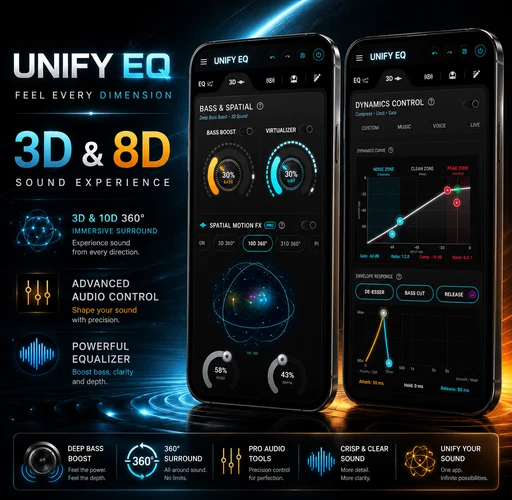
UNIFY Equalizer Bass Booster turns Android into a complete sound studio: 16/31-band EQ, deep bass and volume boost, Crystal Clear™ DSP, AI mastering, dynamics control, immersive spatial audio, a local music player and a community for discovering and sharing presets.

Available for Android · Opens the official Google Play listing · View app ↗
31-band EQBass & volume boostAI mastering3D / 8D soundCommunity presets
UNIFY EQ / MASTER BUSDSP ACTIVE
FREQUENCY RESPONSE20 Hz — 20 kHz
EQ MODE31-BAND
AI MASTERBALANCED
OUTPUT-1.0 dB
CRYSTAL CLEAR™ ONLOOKAHEAD LIMITER
OFFICIAL ANDROID APPUNIFY Equalizer Bass Booster3D Audio Labs · Google Play
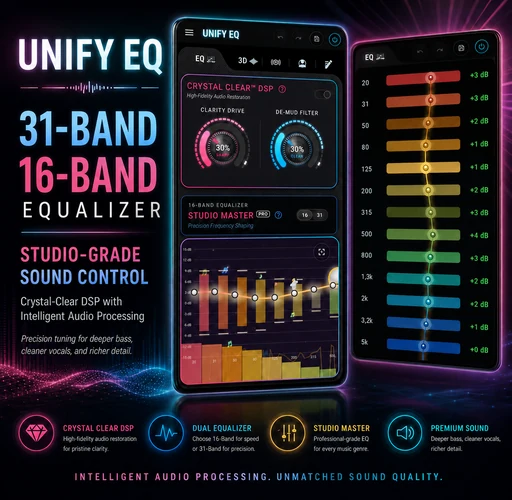
31precision EQ bands
16fast graphic bands
3D / 8Dspatial motion tools
COMMUNITYshare & discover presets
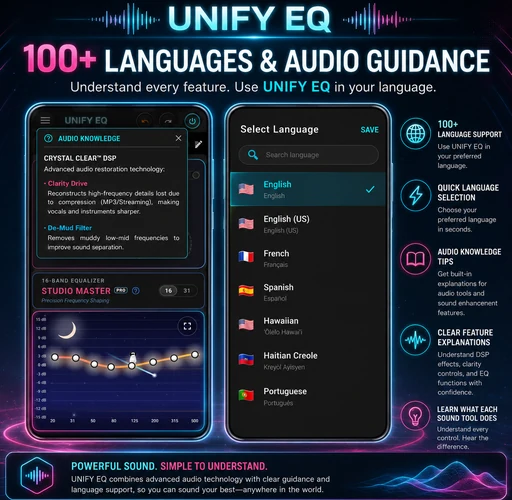
100+languages & audio guidance
Interactive frequency lab

Tune with intent,
not guesswork.

A premium audio interface should make complex processing feel legible. UNIFY EQ separates tone, dynamics and spatial movement into a coherent signal path so every adjustment has a clear purpose.

Live response

Frequency curve

LOW END31–125 Hz
BODY250–800 Hz
PRESENCE1–5 kHz
AIR8–16 kHz

Signal chain

One controlled path from input to output.

01
Graphic EQ16 or 31 bands for tonal balance
ACTIVE
02
Crystal Clear™ DSPClarity drive and de-mud processing
READY
03
AI AGC MasteringAdaptive gain and multi-band control
SMART
04
Dynamics & LimiterCompression, gate and peak protection
SAFE
05
Spatial MotionDepth, movement and immersive width
OPTIONAL
Equalization
31

Studio-level frequency shaping

Switch between fast 16-band control and detailed 31-band tuning. Build precise curves for headphones, speakers, genres or individual tracks.

Intelligence

AI AGC & mastering

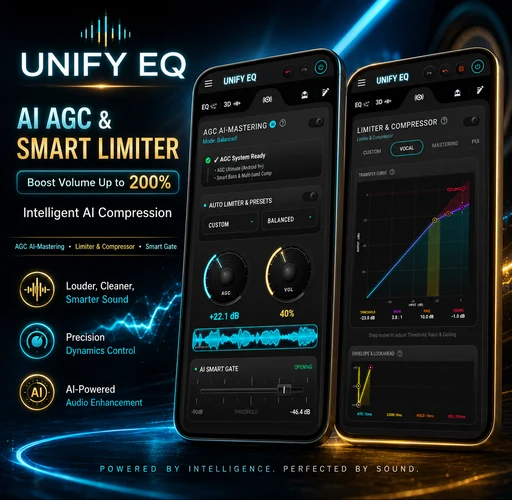
Raise perceived loudness while preserving control through adaptive gain, multi-band compression, smart gate behavior and output limiting.

Clarity

Crystal Clear™ DSP

Recover definition, reduce muddy low-mid buildup and reveal detail without turning the interface into a maze.

Immersion

Spatial motion, depth and dimensional sound

Move beyond static widening with controllable 3D and 8D-style motion, virtualizer depth and real-time spatial visualization.
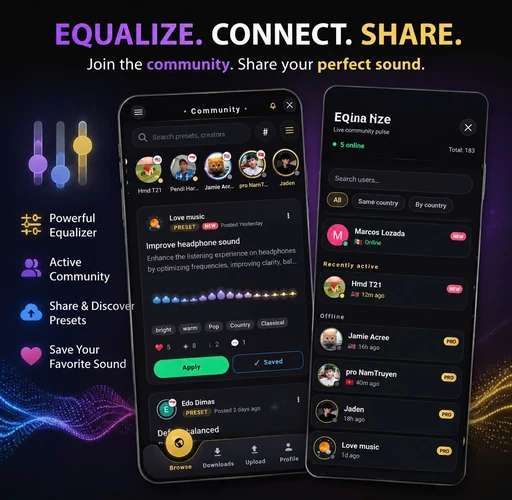
UNIFY Equalizer community presets with browse, upload, downloads, creator profiles and online users LIVE CREATOR PROFILES PRESETS READY TO APPLY
Community presets

Equalize.
Connect. Share.

Great sound does not have to start from zero. Browse presets and time-based segment configurations created by other listeners, apply them to your setup, save favorites and publish your own sound for the community.

01
Discover soundSearch presets, creators, genres, devices and tags. Download a sound and apply it to your own library.
02
Share what you buildUpload custom EQ presets or Music Editor Pro segment configurations with descriptions, cover art and intended devices.
03
Follow the people behind itCreator profiles, followers, comments, favorites, reposts, online presence and community notifications keep ideas moving.
Explore Community in the app ↗ Optional account · Your original music stays on your device
Inside UNIFY EQ

Every tool.
One visual language.

A visual tour of the complete Android sound workflow — precision equalization, mastering, spatial effects, segment automation, preset management, local playback and built-in audio guidance.
More than an equalizer

A complete local
audio workflow.

The app strings describe a much broader product than a basic bass booster. These are the high-value workflows that deserve to be visible to users and searchable by Google.

PLAYER

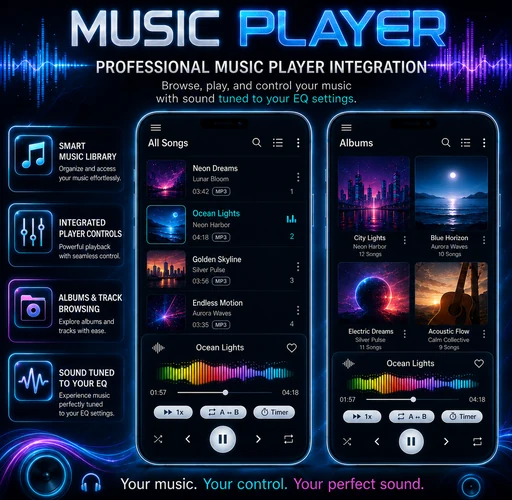
Local music library

Browse all songs, albums, artists and genres; create playlists and favorites; edit tags, lyrics and album artwork without relying on a cloud music source.

  • Albums, artists, genres and playlists
  • Lyrics, metadata and cover editor
  • Favorites and multi-select tools
AUTOMATION

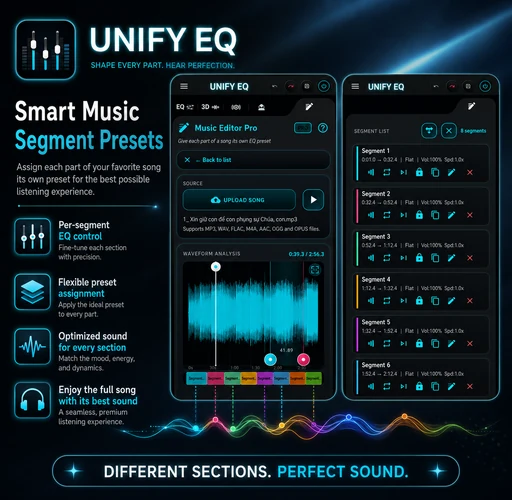
Music Editor Pro

Split one song into timed sections and assign a different equalizer preset to the intro, verse, chorus or drop. Save, import and export the full segment configuration.

  • Waveform and pinch-to-zoom editing
  • Automatic preset switching
  • Reusable segment configurations
PLAYBACK

Control every listening session

Use A ↔ B repeat, playback speed, seek shortcuts, timestamp notes, smart queue modes and foreground playback controls.

  • Append, shuffle, deduplicate or replace queue
  • Filter queue by track duration
  • Per-song notes and repeat controls
SCHEDULE

Sleep, wake and scheduled music

Stop playback after a chosen interval, wake to a selected song or build recurring schedules for different days.

  • Sleep and wake timers
  • Exact-alarm scheduling
  • Recurring day and date rules
PROFILES

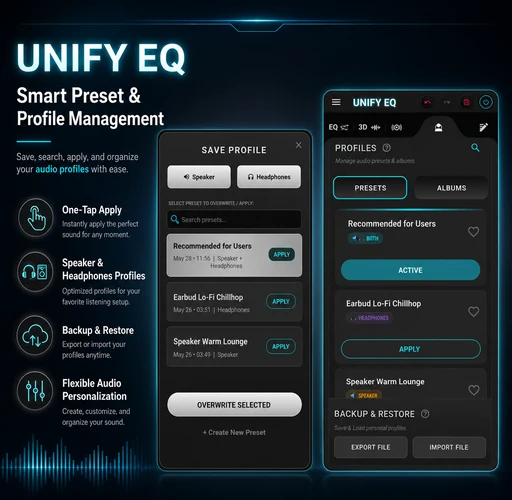
Presets that move with you

Create separate profiles for headphones and speakers, organize presets into albums, pin or duplicate favorites, then export or restore your complete setup.

  • Speaker and headphone profiles
  • Backup, append and overwrite modes
  • Preset search, albums and favorites
ACCESSIBILITY

Learn while you tune

Choose from more than 100 interface languages, use built-in audio knowledge explanations, switch themes and view real-time visualizers that make advanced DSP easier to understand.

  • 100+ languages
  • Audio knowledge guidance
  • Themes and visualizers
Sound in motion

Hear space as a controllable parameter.

Spatial audio in UNIFY EQ is treated as a designed effect, not a decorative toggle. Control depth, width and motion while keeping dynamics and equalization visible in the same system.

3D 360°8D-style motionVirtualizerReverb environmentsReal-time visualization
Questions, answered

Everything users ask before installing.

No. Local audio processing and playback happen on your Android device. Original music files are not uploaded for equalization or playback. Only presets, segment configurations, profile details or community interactions that you intentionally publish are sent to the community service.
Yes. The optional Community lets you browse and search presets, download them to your library, publish your own presets or segment configurations, follow creators, save favorites and join discussions.
16-band mode is faster for broad tonal changes. 31-band mode provides finer control across the audible frequency spectrum for detailed correction and creative sound shaping.
No. It also includes a local music player with playlists, albums, artists, genres, lyrics, tag and album-art editing, smart queue tools, A–B repeat, playback speed, timestamp notes, sleep and wake timers, and Music Editor Pro.
Core equalizer behavior depends on Android, the device, audio route and the active audio session. Reverb and some advanced playback or editor features are designed for music played inside the UNIFY EQ player.
UNIFY Equalizer Bass Booster app icon
AVAILABLE ON GOOGLE PLAY

Turn Android into your personal sound studio.

Download UNIFY Equalizer Bass Booster and start shaping bass, vocals, dynamics and spatial depth with professional control.

Get it on Google Play